iPhone · iPad · Mac · Browser
Scan rooms into 2D floor plans and 3D models
Scan with LiDAR on a supported iPhone or iPad, or enter room dimensions in the app. Refine your layout, add furniture and export a plan you have checked.
Install on iPhone, iPad or a compatible Mac. Review your iCloud-synced plans in the browser.
Open in browser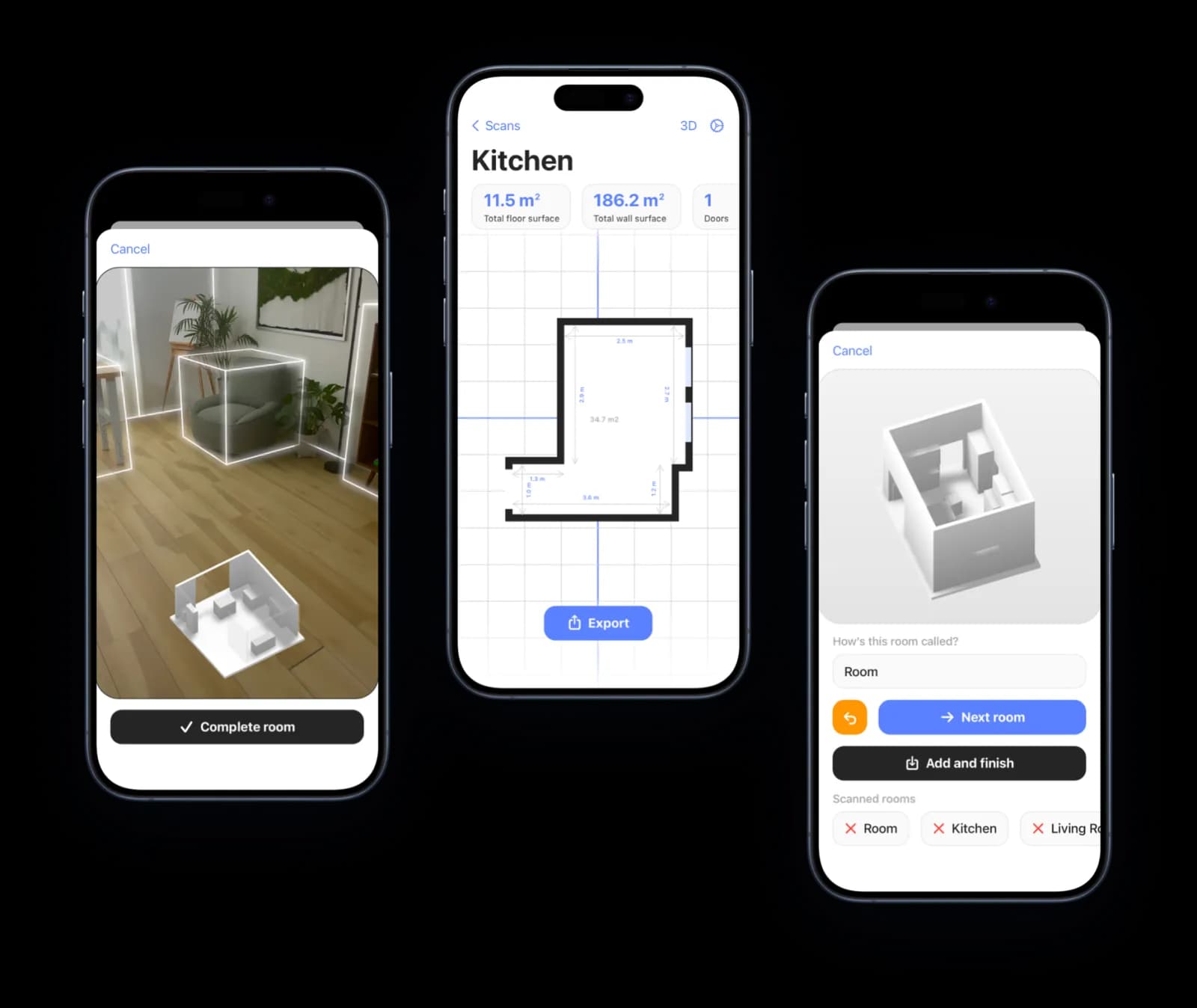
A floor plan you can keep working with
Start with the space in front of you. Room Scanner turns a LiDAR capture or manually entered dimensions into a 2D floor plan and 3D model. Adjust corners and measurements, add missed doors and windows, and try furniture layouts on the plan.
Follow our capture and editing guide, explore room layouts, or see how 3D planning fits your project. Keep scans organised by property and floor, with notes and photos close to the plan they describe.
Comparing your options? See how Room Scanner stacks up against other floor plan scanner apps, read our head-to-head Room Scanner vs RoomScan Pro comparison, or see our guide to the best 3D room scanner apps for textured 3D capture.
See Room Scanner in action
Explore a furnished room in 2D and 3D
See how a sofa, tables, chairs and plants fit into a measured living room with a workspace. Explore the furnished 3D model, then create a floor-plan PDF to share.
Recorded with Pro enabled, using example rooms and the English interface in Room Scanner 1.5.16. Edited for length. The videos show plan creation and review, not a live LiDAR capture.
Read the video walkthrough
A saved example living room opens as a 2D plan with dimensions, a sofa, an armchair, a coffee table, a desk and chair, a rug, plants and storage. The view switches to 3D and rotates to show the furniture layout, then returns to the measured plan. The PDF export preview is opened and the completed PDF appears in the iOS share sheet.
Your plans, across your devices
Scan on site. Work on a bigger screen. Keep your plans close wherever you review them.
iPhone & iPad
Capture a room, refine the plan, add furniture and export your work.
LiDAR scanning needs a supported iPhone Pro or iPad Pro. You can also create rooms by entering dimensions.
Mac
Install Room Scanner and work with your room plans on a bigger screen.
The iPad app is available on Macs with Apple M1 or later and macOS 14 or later.
Browser
Review synced 2D plans, 3D models and survey evidence without installing an app.
Enable iCloud sync in the app, then sign in with the same Apple Account.
More room to create on iPad
Try your next layout before you move a thing.
Arrange furniture, fine-tune dimensions and explore your space in 3D. Turn your finished floor plan into a PDF to share.
Example apartment in Room Scanner 1.5.17 for iPad, with Pro enabled. English interface; edited for length. Shows editing and export.
Read the video walkthrough
A furnished four-room apartment opens in Room Scanner on iPad. Browse the furniture catalog, select and reposition a coffee table, then undo and redo the change. Adjust a window’s width from 1.80 m to 1.90 m and save the edited plan. Rotate the furnished 3D model, preview the floor-plan PDF and open the share sheet. The video ends with a Room Scanner download prompt.
From capture to a usable plan
Review the room, refine the dimensions and keep the details together for your next step.
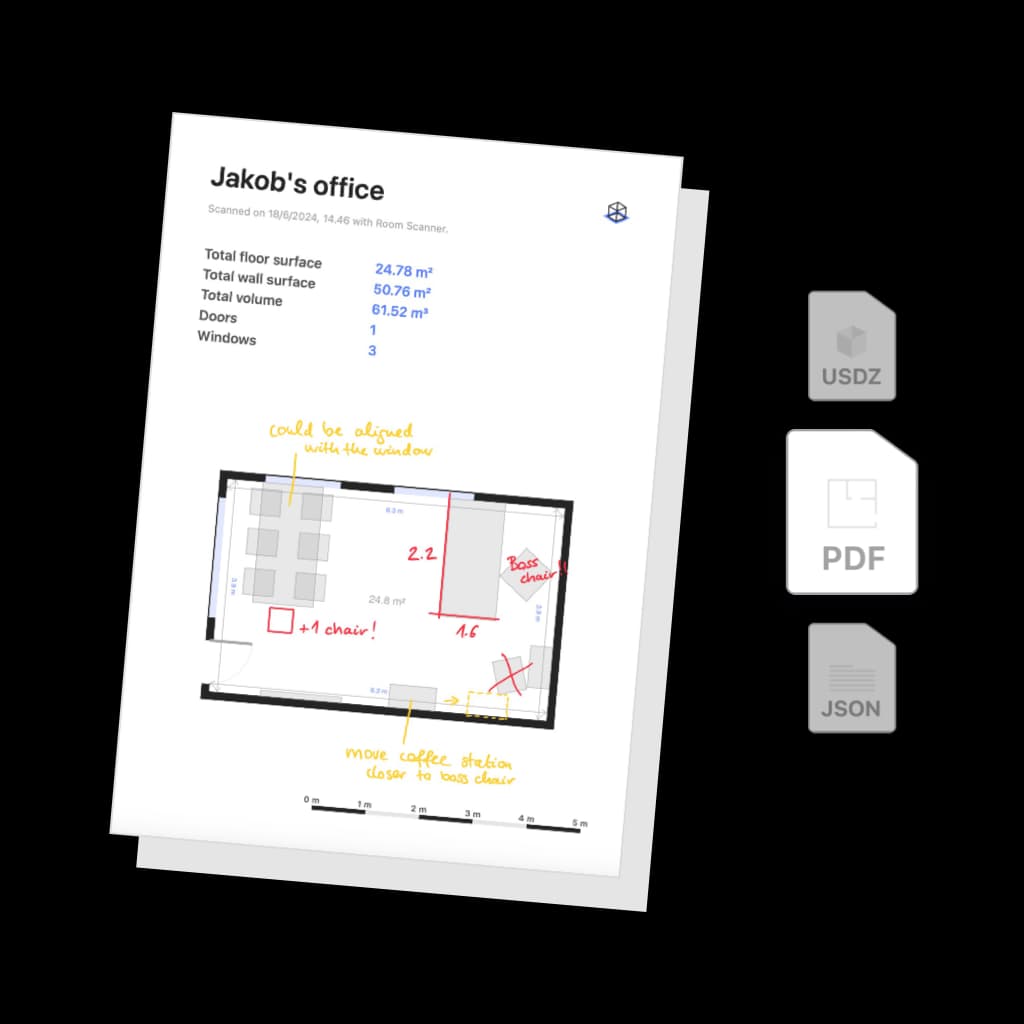
Make pretty PDFs
Export your scans for further use in 3D editors and sketch apps
Capture an existing room, review the measurements and prepare a 2D plan or 3D model. Export a PDF for discussion, a USDZ model, or DXF/SVG drawings for compatible software. Check units and scale in the receiving application.
Preview and adjust
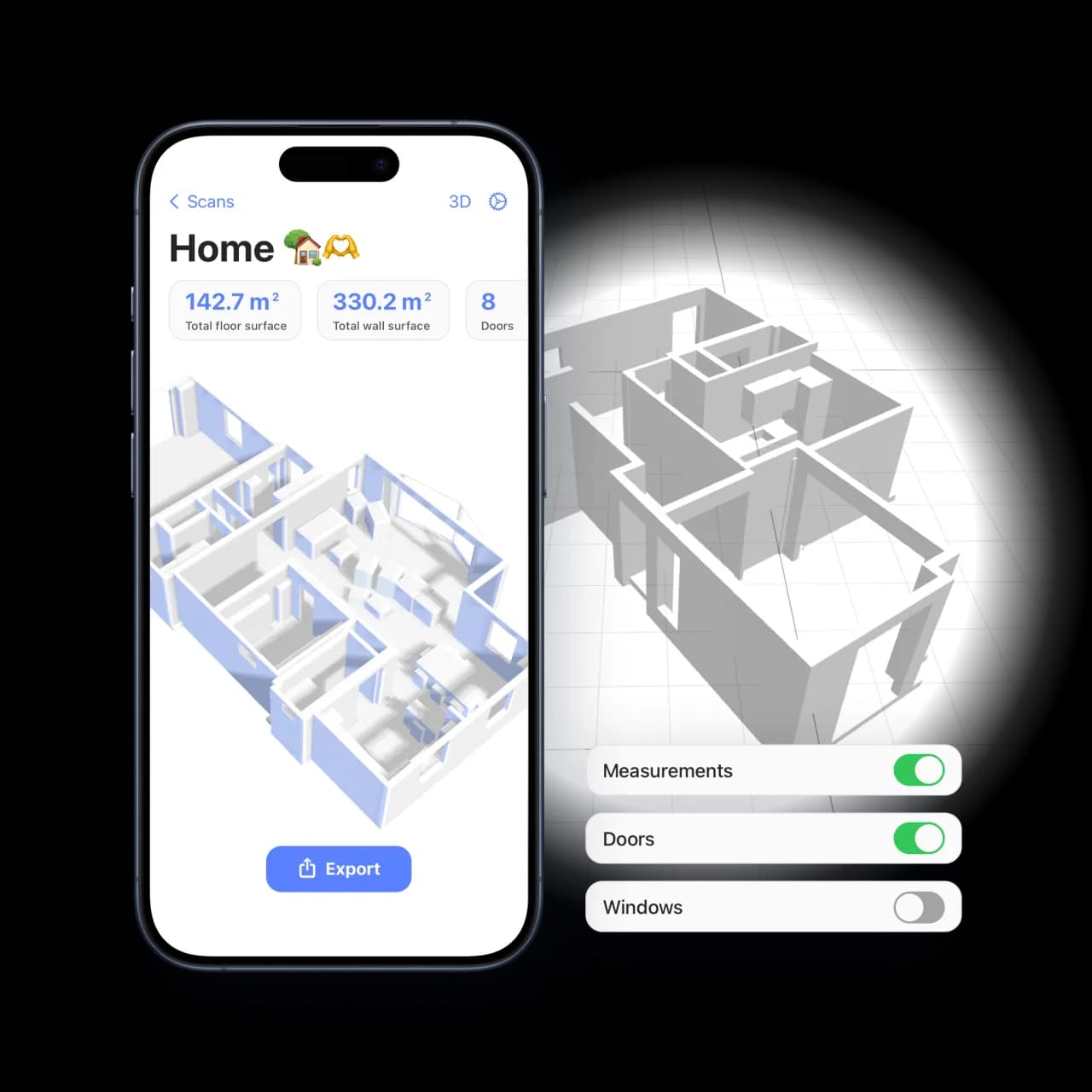
Explore and inspect your space in detail
Switch between the 2D and 3D views, and turn elements on or off to see what matters to you. Our interior design scanner shows the measurements and where the furniture stands, so you can plan around them.
Organize
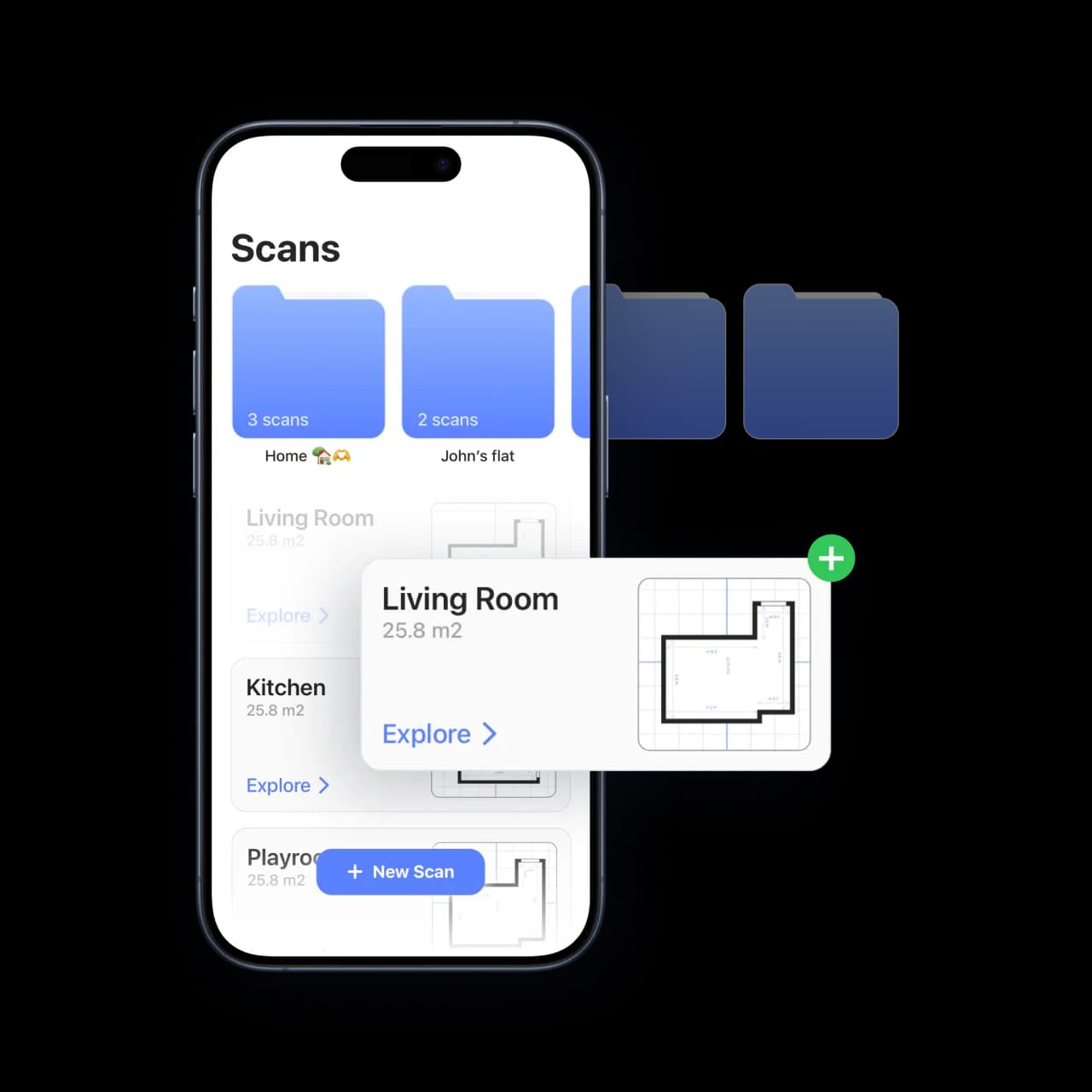
Group your scans by property or project in the app
Organize scans into projects by address, stack them by storey, and access them quickly for reference and updates. Share a branded PDF report with clients, or preview the 3D model in AR right in the room.
Room Scanner vs Other Ways to Make a Floor Plan
Most "floor plan software" means drawing a plan from scratch on a desktop. Room Scanner starts from a real LiDAR scan of your room. Here is how the approaches compare.
| Room Scanner | Desktop floor-plan software | Tape measure + paper | |
|---|---|---|---|
| How you start | Scan the real room with LiDAR | Draw it from scratch | Measure and sketch by hand |
| Accuracy | Captured dimensions you can check and edit | Depends on supplied measurements | Depends on measurement and recording |
| Time per room | Capture, then review and edit | Measure, then draw the layout | Measure and sketch each room |
| 2D plan, 3D model & AR | 2D and 3D; AR on supported iPhone and iPad | Usually 2D and 3D | 2D only |
| Works on | iPhone, iPad, compatible Mac or browser | Desktop or laptop | — |
| Price | Free to start; Pro for unlimited scans & CAD | Often paid or subscription | Cheap but slow |
Workflows vary with the space and the tools used. Check critical measurements on site; the comparison is not an accuracy guarantee.
Everything in the app
Room Scanner is free to download. Scan up to two rooms, edit the plan and view it in 2D, 3D and AR at no cost. Pro removes the scan limit and ads and unlocks the professional exports and tools marked below.
LiDAR scanning
Walk the room and walls, doors, windows and objects are captured automatically. The 2D plan and 3D model are built on the device in minutes.
No LiDAR? Type it in
On iPhone, iPad or a compatible Mac, enter a rectangular or L-shaped room's dimensions to create a plan, 3D model and exports.
Plan editor
Drag corners, type exact lengths and ceiling heights, add missing doors and windows, flip door swings, straighten rooms and undo anytime. Pro adds split and merge, drawing new rooms, wall thickness and saved plan versions.
Furniture layoutsPro
Place pieces from the built-in catalog on your real plan, save alternative layouts and compare them side by side.
Measurements, notes and photos
Add point-to-point measurements, and pin notes and photos to the spot on the plan they belong to. Measurements and photo pins print on every export.
Learn moreEPC and RdSAP survey mode
Classify each wall as heat-loss, party or unheated, watch the perimeter update live, and export a one-page EPC survey plan with Pro.
Learn moreExports
PDF, PNG image, USDZ 3D model and JSON on the free tier after a short ad. Pro adds the branded property report, CSV schedules, the EPC plan and DXF and SVG CAD drawings.
Projects, floors and sync
Group scans by property and floor in the app. After iCloud sync, use My scans in your browser to edit supported survey details, organize evidence and create survey reports or branded Agent property pages. Use iOS for capture, version restoration and additional native export formats.
Metric or imperial units. Available in 10 languages, including English and Danish.
Making Scan-to-CAD Easier!
A LiDAR Scanner in Your Pocket
Use LiDAR on a supported iPhone Pro or iPad Pro to capture a room, then inspect and correct the plan. On a compatible device without LiDAR, enter the room dimensions manually. Check the current App Store device requirements before choosing hardware.
Prepare a CAD handoff
With Pro, export DXF or SVG drawings for further design work. Agree on the format with the recipient, open a sample in their software and check a known distance, units and labels before using the file.
Build a plan across rooms and floors
Scan room after room to assemble a floor plan, then organise floors in a project. Review room joins and check the dimensions that matter before using the combined plan.
How To Create a 3D Copy of a Room
Capture or enter a room, check the geometry and dimensions, then share a reviewed plan. The steps below explain where to inspect the result before moving to the next task.
Scan the Room With Your iPhone or iPad
Stand near the centre of the room, press “New scan” and walk slowly along the walls. To capture a whole apartment or house, press “Scan next room”, walk into the next room and keep going; the app lands each room on the plan next to the ones you have already scanned and saves them together as one floor plan. Save each storey to a project and the building stacks up floor by floor.
Work With Your Home Design Project
Now that the 2D plan and 3D model are on your device, refine them in the plan editor: drag corners, type exact wall lengths and ceiling heights, add a door or window the scan missed, and place furniture from the built-in catalog. Then export a PDF, a USDZ model for Blender or Archicad, or DXF and SVG for CAD.
Review and share the result
Use the 3D view to explain the layout and the dimensioned plan to discuss specific distances. Check critical measurements independently, label the revision and export a file the recipient can use. A room model does not reveal hidden construction details or replace project-specific professional review.

For iPhone, iPad, Mac and your browser
